CODEX_HOMEzorua add work · zorua use work
$ zorua version → Zorua 0.7.1
Many accounts.
One terminal each.
Zorua is a small shell layer for Codex CLI and Claude Code. A terminal's setup is four environment variables, so changing one terminal never touches another. zsh, bash and fish. No daemon, no proxy.
curl -fsSL https://raw.githubusercontent.com/szupzj18/zorua/main/install.sh | shgithub.com/szupzj18/zorua · llms.txt (for agents)
the four slots of a terminal
Pick a scenario. The slots below show what this shell holds after the commands run.
$ zorua use work
this shell -> codex account: work
$ zorua use alt
this shell -> claude account: alt
$ zorua use ds      # plain `codex` runs on deepseek
$ zorua use kimi    # plain `claude` runs on kimi, same shell
$ zorua use work       # codex account
$ zorua use kimi       # claude provider
two different slots; neither replaces the other
$ zorua off providers
cleared the providers; accounts (CODEX_HOME, CLAUDE_CONFIG_DIR) kept
$ zorua off
cleared CODEX_HOME, CLAUDE_CONFIG_DIR and the providers; back to defaults
account (a subscription login)
provider (a third-party endpoint)
Codex CLI
ZORUA_CODEX_PROVIDERzorua provider add ds --codex … · zorua use dsClaude Code
CLAUDE_CONFIG_DIRzorua add --claude alt · zorua use altZORUA_CLAUDE_PROVIDERzorua provider add kimi … · zorua use kimiEach slot holds one value per terminal. zorua use fills one slot and leaves the others alone.
commands
| command | what it does |
|---|---|
| zorua add [--claude] <name> | new account directory and sign-in |
| zorua use <name> | use - | fill a slot in this shell | clear everything |
| zorua <name> [args] | one-shot run; stale ANTHROPIC_* variables are cleaned for the run |
| zorua bind [name] | this directory switches automatically on cd |
| zorua usage [-v | --json] | 5h / 7d limits per account; --json for other front ends (no tokens, no keys) |
| zorua provider add|models|import | manage endpoints, their models, and import from cc-switch |
| zorua provider get|put | one provider as JSON (keys masked) and back; keeps providers.json.bak |
| zorua provider check | is the endpoint reachable and the key accepted; latency, never prints the key |
| zorua off providers main | clear the provider slots, keep the accounts |
| zorua off | clear all four slots |
defaults for new Claude accounts main
$ cat ~/.config/zorua/claude-settings.json
{ "env": { "HTTPS_PROXY": "http://127.0.0.1:7897", "NO_PROXY": "localhost,127.0.0.1" } }
$ zorua add --claude second        # settings.json starts from the template
Copied only when the new account has no settings.json yet; an existing one is never overwritten.
usage board
$ zorua usage
 Codex
   NAME     PLAN    5H           7D           RESET
 ● default  pro     –            ▓░░░░░   6%  4d9h
   side     team    ░░░░░░   0%  ▓▓░░░░  26%  1d15h

 Claude Code
   NAME  PLAN  5H           7D           RESET
   alt   max   ▓▓▓░░░  42%  ▓░░░░░   7%  4d9h
web dashboard optional
$ cd web && npm ci && npm run build && npm start
http://127.0.0.1:4747  (loopback only)
A local page for accounts, 5h/7d usage, providers and directory bindings: add, remove and sign in, and edit a provider's env variables, key and model list. Keys stay masked until you press show or copy. Dark by default; light follows the system. Press ⌘K (or /) to jump to any account or provider, and ? lists the single-key shortcuts. It runs the same zorua commands, is not installed by the installer, and is a separate process: Zorua itself still has no daemon.
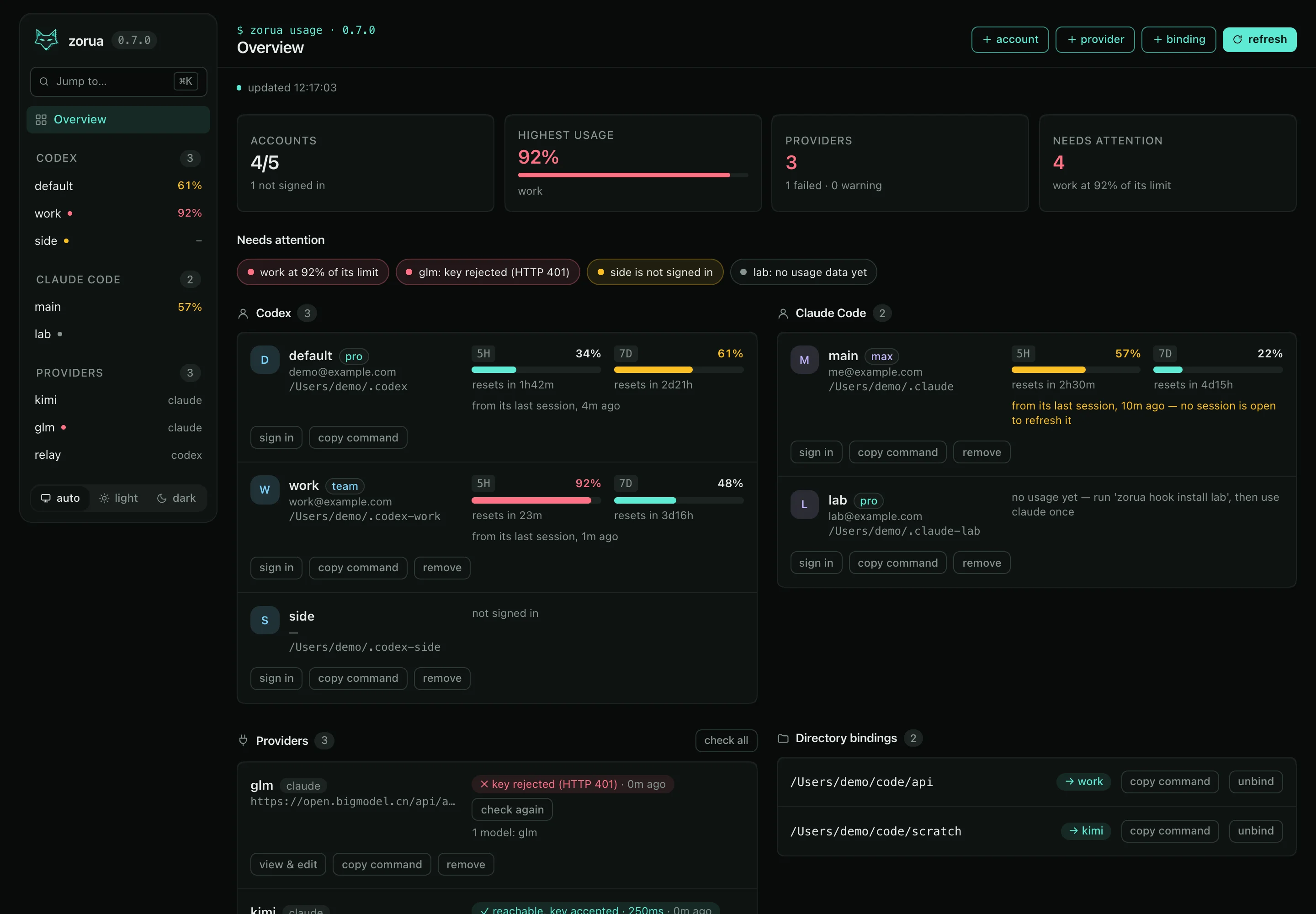
The real dashboard, running in your browser on made-up data: click around, press ⌘K, switch the theme. Nothing leaves this page, and a reload starts over. Open it full size.